
Please follow this guide to upload your Instagram analytics screenshots.
💡 Uploading your Instagram analytics helps unlock higher-paying campaigns, better brand matches, and improves your visibility in Lit search results.
REQUIRED #
You do NOT need to upload everything from Insights — only these three sections, with a few specific requirements.
All screenshots must be set to Last 60 days.
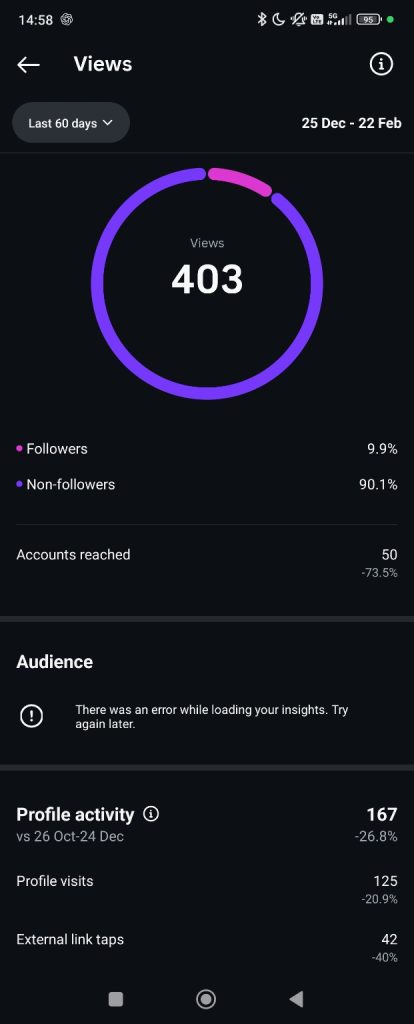
🟢 Screenshot 1: Views #
Path #
Profile → ☰ Menu → Professional dashboard → Insights → Views → Select Last 60 days
Capture the screen showing:
Must include:
- Total Views
- Followers vs Non-followers %
- Accounts reached
- Profile visits
- External link taps
📌 Make sure all of these are visible in the same screenshot or by scrolling slightly.
Example Screenshot:
🟢 Screenshot 2: Interactions (IMPORTANT – must be REELS) #
Path #
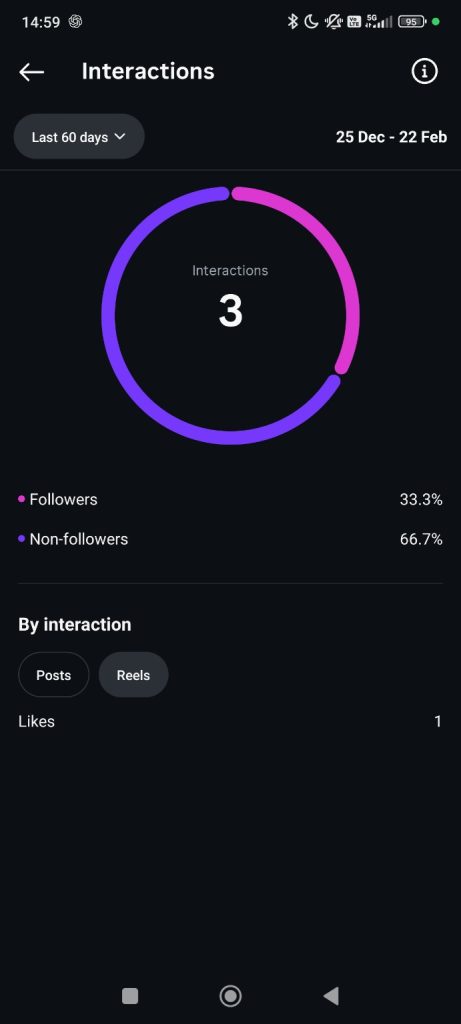
Insights → Interactions → Select Last 60 days
Then:
👉 Tap REELS (not Posts)
Capture:
Must include:
- Total Interactions
- Followers vs Non-followers %
- Likes (from Reels)
⚠️ You MUST select “REELS”.
Do not submit Posts interactions — brands care about Reel performance.
Example screenshot:
🟢 Screenshot 3a + 3b: Followers (TWO screenshots required) #
Path #
Insights → Followers → Select Last 60 days
You must send TWO screenshots from this section:
Screenshot 3a – Cities #
Capture:
- Growth graph
- Top locations → Towns / Cities
- Age ranges
- Gender breakdown
- Most active times (hours)
Make sure peak active hours are visible.
Example screenshot:

Screenshot 3b – Countries #
From the same Followers screen:
Tap Countries
Capture:
- Country breakdown (percentages visible)
Example screenshot:
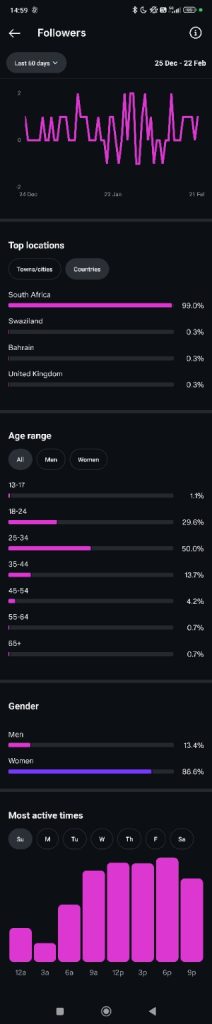
Both Cities and Countries are required.
🚫 Please do NOT send #
You do NOT need:
- Individual post stats
- Content tab
- Inspiration tab
- Daily graphs
Only the screenshots listed above.
📤 Upload Instructions #
Upload all screenshots together in one submission on Lit.
If your phone can’t capture everything in one image, you may upload multiple screenshots of the same section.
Just make sure nothing important is cropped out.
⚠️ Common mistakes to avoid #
- Forgetting to select Last 60 days
- Submitting Posts instead of Reels in Interactions
- Missing Cities or Countries
- Cropping out follower vs non-follower percentages
- Blurry screenshots
- Sending desktop screenshots
These will delay verification.
Why we ask for this #
These screenshots allow Lit to:
✅ Calculate your Audience Quality Score
✅ Calculate your Creator Trust Score
✅ Understand your audience demographics
✅ Measure discovery vs follower reach
✅ Match you to better-paying campaigns
✅ Improve brand fit accuracy
Creators who keep analytics updated are prioritised in searches and campaigns.
Creators who don’t may be temporarily deprioritised.
Your data is used only for campaign matching inside Lit.